
Use Microsoft Teams incident actions
Act on OpsKnight incidents from verified Adaptive Cards.
Before you begin
Install Teams, map a service destination, and trigger a synthetic incident.
Adaptive Card actions enter through the Bot messaging endpoint. OpsKnight validates the Bot token, tenant, trusted service URL, installation, destination, action schema, identity, and product authorization before applying a command.
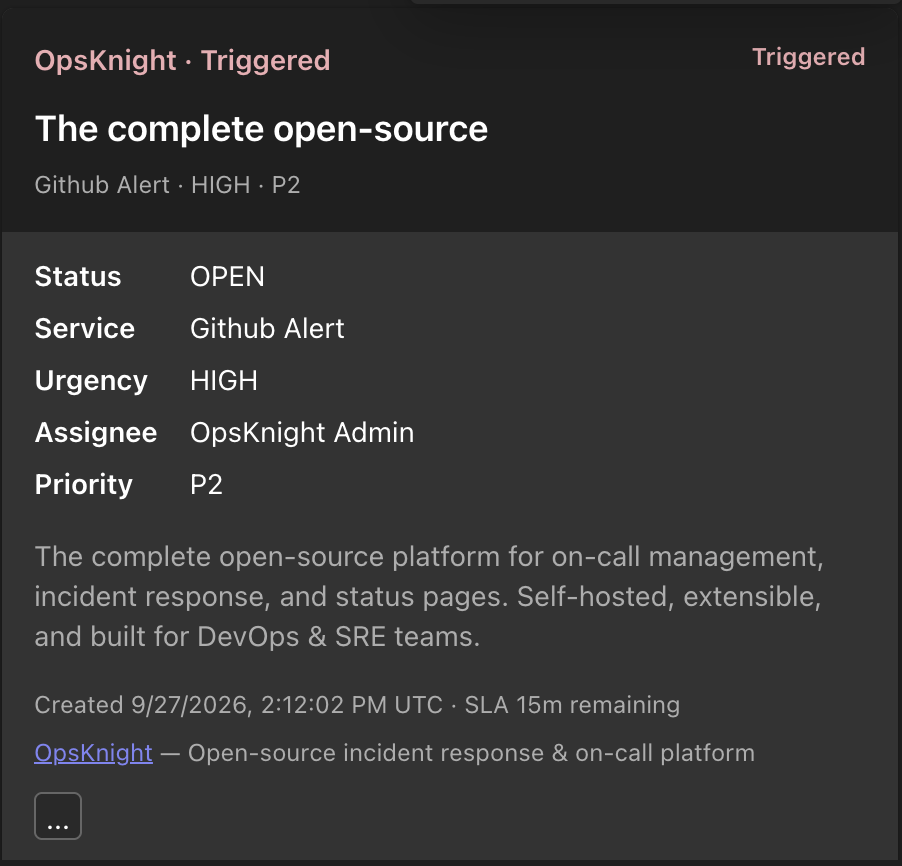
The normal incident card gives responders the incident status, service, urgency, assignee, priority, description, and creation time in one view.
Open the feature
Open the current incident Adaptive Card in its routine service destination or incident war-room channel.
Configure the action
Confirm the incident, current status, service, urgency, assignee, and priority. Choose only an action that reflects the real operational state. Complete identity linking before a user-attributed action.
Complete the action
- Open the incident Adaptive Card.
- Choose an action available to your responder role.
- Complete identity linking if prompted.
- Confirm the OpsKnight timeline and all destination cards converge.
What OpsKnight does
OpsKnight applies the same authorization and lifecycle transition as the UI, records the actor/timeline, applies escalation/notification effects, and reconciles all card projections. A stale or concurrent action is evaluated against current state.
Verify it worked
After acknowledging, assigning, escalating, or resolving, verify the authoritative OpsKnight status, actor, timeline, escalation effect, and all cards. Preserve activity ID/service URL when reporting failure, but never credentials/tokens.
Change or undo the action
Do not edit the Teams post to imply a state change. Use supported OpsKnight lifecycle/follow-up action to correct state or add context.
Troubleshooting
Identity prompt repeats: relink the matching active responder account.
Forbidden: check tenant/installation/destination validation, user mapping, product role/scope, and current state.
Teams times out: inspect OpsKnight incident and operation before retrying; the action may already have applied.
Next steps
Last updated for v2.0.0
Edit this page on GitHub