
Overview
OpsKnight Documentation
Welcome to OpsKnight — the open-source incident management platform built for modern DevOps and SRE teams. This documentation will guide you from initial setup to advanced configuration, helping you build a world-class incident response capability.
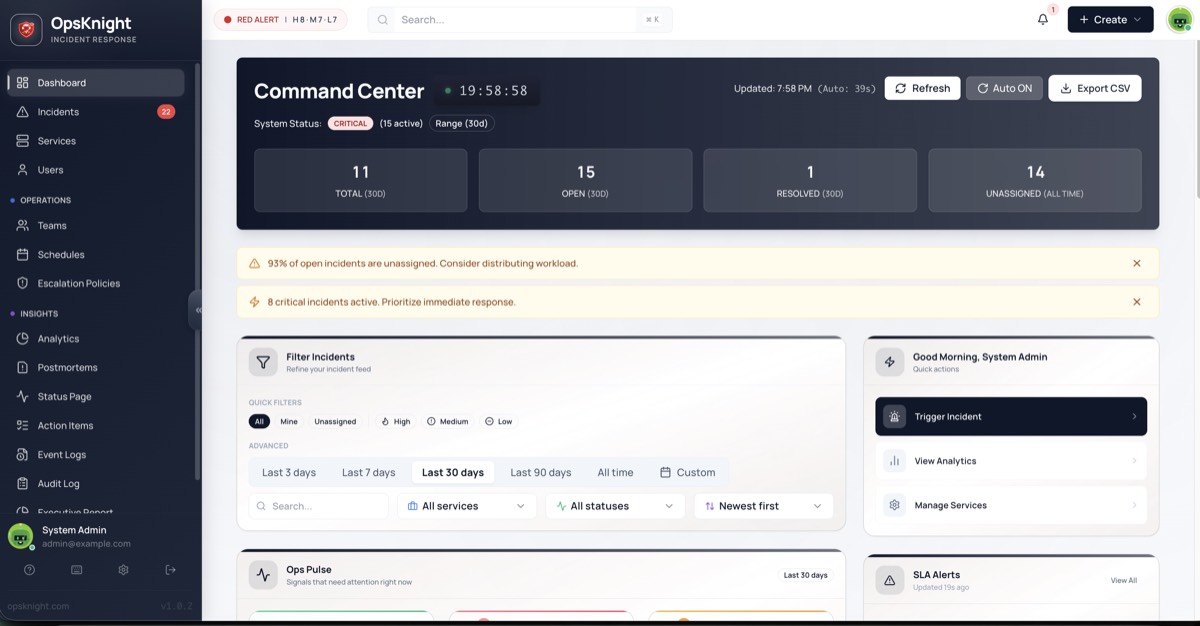
Command Center Dashboard
The OpsKnight Command Center gives you complete visibility into your system's health.
- Real-time incident tracking
- Team availability status
- Service health at a glance
Mobile PWA + Push notifications
- Install OpsKnight on iOS/Android as a PWA (no app store wait)
- Receive push notifications with incident context
- Take action from anywhere, instantly
Why OpsKnight?
When an incident strikes, every second counts. OpsKnight ensures the right person gets notified instantly, through the right channel, with all the context they need to resolve issues fast.
The Problem: Alert fatigue, missed notifications, unclear ownership, and slow response times cost businesses millions in downtime and erode customer trust.
The Solution: OpsKnight provides a unified incident management platform that:
- Routes alerts intelligently to on-call responders
- Escalates automatically when incidents go unacknowledged
- Provides complete visibility through dashboards and analytics
- Communicates status transparently to stakeholders
Documentation Sections
| Section | Description | Start Here If... |
|---|---|---|
| Getting Started | Installation, configuration, and your first incident | You're new to OpsKnight |
| Core Concepts | Services, incidents, schedules, escalation policies | You want to understand how things work |
| Integrations | Connect 20+ monitoring tools, Slack, and custom webhooks | You need to route alerts from your stack |
| Administration | Notifications, audit logs, data retention, custom fields | You're setting up for a team |
| API Reference | Events API, incident management, CLI tooling | You're building automations |
| Deployment | Docker, Kubernetes, Helm, and PWA setup | You're ready for production |
| Security | SSO/OIDC, encryption, access control | Security and compliance matter |
| Architecture | System design, observability, and scaling | You need to understand the internals |
| Mobile | PWA features, mobile UX, push notifications | You need on-call on the go |
Platform Overview
OpsKnight is a complete incident management solution with six core pillars:
1. Incident Management
Turn noisy alerts into actionable incidents with full lifecycle tracking from trigger to resolution.
2. On-Call Scheduling
Build flexible rotation schedules with multiple layers, timezone support, and easy overrides.
3. Escalation Policies
Define multi-tier escalation chains that ensure incidents always reach someone who can help.
4. Multi-Channel Notifications
Reach responders through Email, SMS, Push, Slack, WhatsApp, or custom webhooks.
5. Public Status Pages
Keep customers informed with beautiful, real-time status pages showing service health.
6. Analytics & SLA Tracking
Measure MTTA, MTTR, and SLA compliance to continuously improve your incident response.
How It All Connects
Understanding the relationship between OpsKnight components helps you design effective incident workflows:
┌─────────────────────────────────────────────────────────────────────────┐
│                           ALERT SOURCES                                 │
│   Datadog • Prometheus • CloudWatch • Sentry • GitHub • 20+ more        │
└──────────────────────────────┬──────────────────────────────────────────┘
                               │
                               ▼
┌─────────────────────────────────────────────────────────────────────────┐
│                            SERVICES                                     │
│   Your monitored systems (APIs, databases, infrastructure)              │
│   Each service has an ESCALATION POLICY attached                        │
└──────────────────────────────┬──────────────────────────────────────────┘
                               │
                               ▼
┌─────────────────────────────────────────────────────────────────────────┐
│                            INCIDENTS                                    │
│   Created when alerts fire • Tracked through lifecycle                  │
│   OPEN • ACKNOWLEDGED • SNOOZED • SUPPRESSED • RESOLVED                 │
└──────────────────────────────┬──────────────────────────────────────────┘
                               │
                               ▼
┌─────────────────────────────────────────────────────────────────────────┐
│                       ESCALATION POLICY                                 │
│   Step 1: Primary On-Call (from SCHEDULE) → wait 5 min                  │
│   Step 2: Secondary On-Call → wait 10 min                               │
│   Step 3: Team Lead → wait 15 min                                       │
│   Step 4: Repeat                                                        │
└──────────────────────────────┬──────────────────────────────────────────┘
                               │
                               ▼
┌─────────────────────────────────────────────────────────────────────────┐
│                         NOTIFICATIONS                                   │
│   EMAIL • SMS • PUSH • SLACK • WHATSAPP • WEBHOOK                       │
│   Sent to on-call person → Escalated if no acknowledgment               │
└─────────────────────────────────────────────────────────────────────────┘
The Flow:
- Alert sources (monitoring tools) send events to OpsKnight via webhooks
- Services represent your systems and route alerts to the right escalation policy
- Incidents are created and tracked through their lifecycle
- Escalation policies determine who gets notified and when
- Schedules tell the policy who is currently on-call
- Notifications go out through configured channels until someone acknowledges
Quick Start
Get OpsKnight running in under 5 minutes:
# Clone the repository
git clone https://github.com/dushyant-rahangdale/opsknight.git
cd opsknight

# Configure environment
cp env.example .env
# Edit .env with your settings (DATABASE_URL, NEXTAUTH_SECRET)

# Start with Docker Compose
docker compose up -d
Access OpsKnight at http://localhost:3000 — you'll be directed to the /setup page to create your admin account. Enter your name and email, then save the generated password securely (it's shown only once).
Next: Follow the First Steps Guide to create your first service and incident.
Key Features at a Glance
For Responders
- Mobile-first PWA — Handle incidents from anywhere
- One-click acknowledge — Stop the pager with a single tap
- Rich context — See timeline, notes, and related alerts
- Smart notifications — Get notified through your preferred channel
For Team Leads
- Fair scheduling — Balanced on-call rotations with easy overrides
- Escalation assurance — Incidents never fall through the cracks
- Team dashboards — See your team's incident load at a glance
- Post-mortems — Learn from incidents with structured retrospectives
For Operations
- 20+ integrations — Connect your entire monitoring stack
- Custom webhooks — Integrate with any tool via generic webhooks
- API-first — Automate everything with comprehensive APIs
- Self-hosted — Keep your data on your infrastructure
For Leadership
- SLA tracking — Monitor MTTA/MTTR against targets
- Analytics dashboards — Trend analysis and insights
- Status pages — Transparent communication with customers
- Audit logs — Full visibility into system changes
Architecture Highlights
OpsKnight is built on modern, battle-tested technologies:
| Component | Technology | Why |
|---|---|---|
| Frontend | Next.js 16 + React 19 | Server-side rendering, great DX |
| UI Components | Radix UI + Tailwind CSS | Accessible, beautiful design |
| Database | PostgreSQL 14+ | Reliable, performant, self-hosted |
| ORM | Prisma | Type-safe database access |
| Auth | NextAuth + OIDC | Flexible authentication |
| Deployment | Docker, Kubernetes, Helm | Deploy anywhere |
No external dependencies required — OpsKnight uses a Postgres-based job queue, eliminating the need for Redis or other services.
Getting Help
- Documentation — You're here! Browse the sections above.
- GitHub Issues — Report bugs or request features
- Community Discord — Join discussions with other users
- Contributing — Contribution guidelines
What's Next?
- Install OpsKnight — Get a running instance
- Complete First Steps — Create your first incident
- Understand Core Concepts — Learn how everything works
- Connect Integrations — Route alerts from your stack
- Configure Notifications — Set up alert channels
Ready to eliminate alert chaos? Let's get started with the Installation Guide.